
In this blog, you’ll learn how to set up pricing, understand where each plan is used, and connect Billing Group financial results to the pricing model behind them.
What are Pricing Plans in AWS Billing Conductor?
Pricing Plans are the commercial layer that defines how AWS Billing Conductor calculates pro forma charges for Billing Groups. For MSPs and Distributors, that makes the Pricing Plan central to customer onboarding, pricing changes, billing reviews, and margin management.
What’s new: Pricing Plan management in DAY2
DAY2 now gives users visibility and control over customer-managed Pricing Plans. Users can create and update plans, associate Pricing Rules, see the Standard and Billing Transfer Billing Groups using each plan, and open a Pricing Plan directly from Billing Group Details.
The result is a connected billing workflow: commercial terms can be translated into a pricing setup, that setup can be reused where appropriate, and teams can see which customer relationships depend on it before making a change.
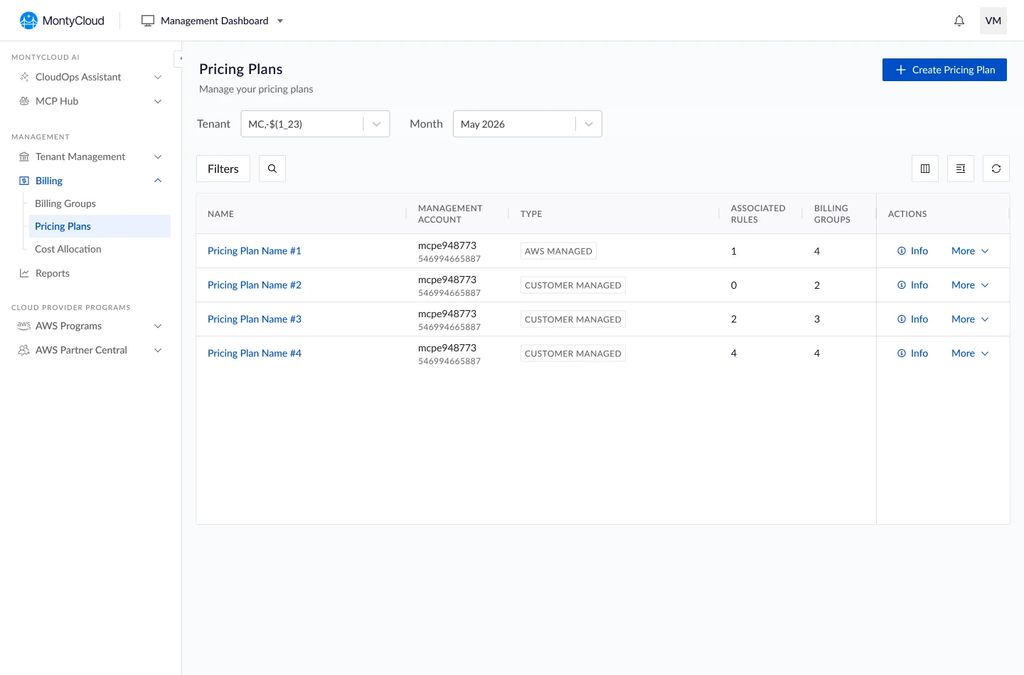
Pricing Plans management in MontyCloud DAY2 for AWS Billing Conductor
What this changes for AWS MSPs and Distributors
| Business outcome | What users can now do |
|---|---|
| Turn customer commercial terms into a controlled billing setup | Create a customer-managed Pricing Plan, associate the Pricing Rules that reflect the agreement, and connect the plan to the relevant Billing Group. |
| Apply the same pricing model consistently where the same terms exist | Use one Pricing Plan across multiple Billing Groups when those customer relationships follow the same commercial structure. |
| Understand the customer reach of a pricing change | See the Standard and Billing Transfer Billing Groups using a plan before changing its pricing configuration. |
| Move faster from charge or margin review to pricing action | Open the assigned Pricing Plan directly from Billing Group Details, review the pricing model behind the customer result, and make the required update with that context in view. |
How to manage customer pricing with Pricing Plans in DAY2
Build pricing around the customer agreement
A Pricing Plan groups the Pricing Rules that define customer-facing pro forma pricing. In DAY2, users can create a customer-managed plan, select the rules that reflect the commercial model, add tags, and review the complete setup before creation. This supports new customer onboarding and new pricing structures while keeping the pricing setup tied to the billing context it will support.
The Pricing Plans page also gives teams a portfolio view of the plans available under each Management Account, including plan type, associated Pricing Rules, and the number of Billing Groups using each plan.
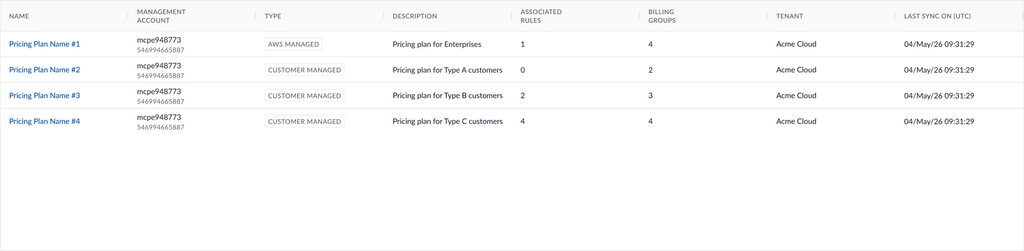
DAY2 Pricing Plans list with plan type, Pricing Rules, and Billing Group count per Management Account
See where each pricing model is being used
A Pricing Plan can support multiple Billing Groups. Pricing Plan Details shows the plan configuration, the Pricing Rules it contains, and the Standard and Billing Transfer Billing Groups using it. This gives billing and finance teams a clear view of the customer relationships that depend on the same pricing model.
For a shared plan, teams can answer two business questions before making a change: which customer relationships use this plan, and what pricing structure do they share?

DAY2 Pricing Plan Details page showing Pricing Rules and associated Billing Groups
Move from Billing Group performance to the pricing behind it
Billing Group Details shows AWS Cost, Charged Amount, Margin, and the assigned Pricing Plan. The Pricing Plan name is now clickable and opens the corresponding Pricing Plan Details page directly.
When finance or FinOps teams review a customer charge or margin movement, they can move straight to the pricing model associated with that Billing Group, inspect the Pricing Rules, and see where else the same plan is used. This gives teams the pricing context they need to investigate the result and decide whether a pricing change is required.

DAY2 Billing Group Details showing AWS Cost, Charged Amount, Margin, and a linked Pricing Plan
Change pricing with the customer impact in view
When pricing terms change, users can update the plan details, add or remove Pricing Rules, manage tags, and review the final setup before saving. Because the same plan may support multiple Billing Groups, DAY2 keeps plan usage visible so teams know which customer relationships are covered by the change.
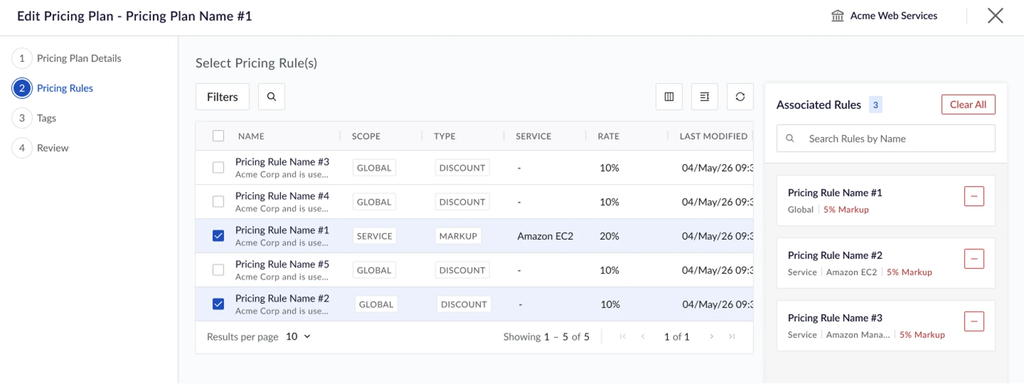
The Edit Pricing Plan flow keeps the selected Pricing Rules visible while the updated pricing setup is reviewed.
Controls that protect active customer pricing
Customer-managed Pricing Plans can be managed in DAY2. AWS-managed Pricing Plans remain read-only, and a plan that is still used by Billing Groups cannot be deleted. These controls help protect active customer pricing relationships while keeping customer-managed pricing flexible.
What Pricing Plans enable for MSP billing operations
For MSPs and Distributors, the value is operational: customer pricing can be set up once, applied consistently where the same commercial terms exist, reviewed in the context of the Billing Groups that use it, and changed with clearer visibility into customer impact. Combined with Billing Group charge and margin visibility, Pricing Plans give billing teams a more complete path from commercial terms to customer billing operations.
How to get started with Pricing Plans in DAY2
In DAY2, go to Management Dashboard, Billing, then Pricing Plans to review or manage Pricing Plans. Open a plan to see its Pricing Rules and the Standard or Billing Transfer Billing Groups using it. From Billing Group Details, select the Pricing Plan name to open that plan directly when reviewing a customer charge or margin.
We’re also happy to walk you through a demo. Request one here.
Frequently asked questions (FAQs) about Pricing Plans in DAY2
What is a Pricing Plan in AWS Billing Conductor, and why does it matter to an MSP?
A Pricing Plan is a collection of Pricing Rules that defines the pro forma pricing applied to Billing Groups. For an MSP or Distributor, it turns customer commercial terms into a pricing setup that can be applied consistently across the relevant customer billing relationships.
Can the same Pricing Plan be used across multiple Billing Groups?
Yes. A Pricing Plan can be associated with multiple Billing Groups when those customer relationships follow the same commercial terms. A Pricing Plan is limited to a single Management Account, so it cannot be shared across Management Accounts.
What should teams review before changing a shared Pricing Plan?
Review the Pricing Rules in the plan and the Billing Groups that currently use it. Because the same plan can support multiple customer relationships, this helps teams understand who will be affected before changing customer pricing.
How do Billing Groups and Pricing Plans work together in DAY2?
Billing Group Details shows the customer charge, AWS Cost, Margin, and assigned Pricing Plan. The Pricing Plan name links directly to Pricing Plan Details, where users can review the pricing configuration and the other Billing Groups using the same plan.
How does this help with billing and margin reviews?
When a charge or margin needs investigation, teams can move from the Billing Group financial result to the pricing model behind it. DAY2 brings the financial and pricing context together, but it does not automatically assign a root cause to a margin change.
Can a Pricing Plan be deleted while Billing Groups are still using it?
No. DAY2 blocks deletion while the Pricing Plan is still in use by one or more Billing Groups. The plan must no longer be used by those Billing Groups before it can be deleted.
Do Pricing Plan changes rewrite previous billing periods?
No. Pricing Plan changes apply to the current billing period. Previous billing periods remain unchanged, preserving the historical billing view.