
What is AWS Partner Revenue Measurement (PRM)? AWS Partner Revenue Measurement (PRM) is the attribution mechanism AWS uses to credit partner-influenced customer spend. Attribution depends on resource-level tagging, so spend on an untagged resource is spend AWS does not credit to the partner. MontyCloud automates PRM tagging through governed policies and shows how much eligible spend is tagged and untagged.
Key takeaways
- PRM attribution depends on consistent resource tagging across every account and tenant in scope.
- Manual tagging does not scale across managed service provider (MSP) customer environments, and every gap reduces credited spend.
- MontyCloud PRM tagging policies can be scoped by tenant, account, and AWS region, and run on a daily tagging pipeline.
- Each policy reports total, tagged, and untagged spend by service and resource.
- Read-only (Audit) tenants can still be measured when the AWS Cost and Usage Report (CUR) option is enabled.
Why does AWS PRM tagging matter for MSPs and partners?
For MSPs and partners, PRM attribution now carries real weight:
- AWS uses PRM to measure partnership success across its partner programs and benefits.
- PRM is a precondition for AWS partner funding requests, including Marketing Development Funds (MDF).
- Partner-channel guidance also links PRM data to co-sell visibility with AWS field sellers, Sales Development Funds (SDF) decisions, and APN Customer Engagements (ACE) motion priority.
Attribution depends on consistent tagging. MontyCloud turns PRM tagging into an automated, governed platform capability, and shows exactly how much eligible spend that tagging is capturing.
This post covers why PRM tagging breaks down at scale, what is new in this release, and how to set up PRM tagging in MontyCloud in seven steps.
Why does PRM readiness break down at scale?
PRM relies on resource-level tagging to attribute AWS service consumption to partner products. It’s simple in theory and complex across many accounts and offerings. Teams must keep the right resources in scope, select the correct services, and apply tags consistently over time. Without a repeatable process, tagging becomes a manual task that is hard to govern.
For MSPs, the problem multiplies across customer environments. Manual tagging does not scale, and every coverage gap directly reduces the spend credited to the partner.
Scope is rarely uniform, either:
- Some customers hand over a handful of accounts rather than an entire tenant.
- Some environments are read-only, where tags cannot be written at all.
- Workloads sit in specific AWS regions.
- New accounts and resources appear every week.
Attribution has to follow those boundaries precisely.
Even when tagging runs well, most teams still cannot answer the question finance asks: how much of our eligible AWS spend is attributed today, and how much is leaking because resources are untagged?
How does MontyCloud automate PRM tagging?
MontyCloud replaces ad hoc tagging with PRM tagging policies. MSPs define the scope by tenant, account, and region, select eligible services and resources, and let MontyCloud apply tags through a daily tagging pipeline. Each policy then reports how much eligible spend is tagged and how much is not.
The result is a predictable, repeatable way to run PRM tagging and attribution across tenants, without adding manual overhead.
How is MontyCloud different from tagging scripts?
Three things set MontyCloud apart from ad hoc tagging scripts and one-off workflows.
Attribution that follows real scope. Policies can target tenants, individual AWS accounts, and specific AWS regions. Because an account can belong to only one PRM policy at a time, overlapping attribution is prevented by design.
Measurement where tags cannot be written. Audit tenants with CUR enabled can be included, so tagging coverage and spend are still reported for environments the platform cannot modify.
Spend, not just tag status. Every policy shows total, tagged, and untagged spend, down to service and resource level, so teams can trace gaps to the workloads causing them and fix the ones costing the most attributed revenue.
What’s new in MontyCloud PRM tagging?
Account-level scope. Policies were previously scoped to tenants only. You can now select one or more specific connected accounts within a tenant, and only those accounts are tagged and attributed. Accounts created later are not added automatically when you use account selection. An account can belong to only one PRM policy, so accounts already in another policy cannot be selected.
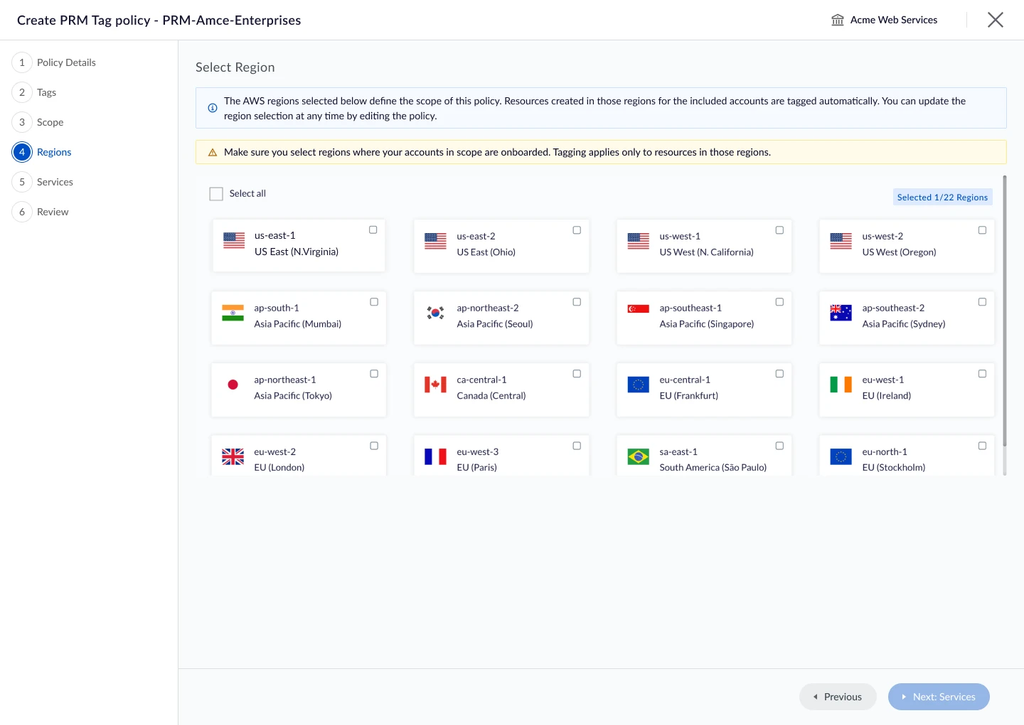
AWS region selection. Choose the AWS regions a policy covers. Only regions supported by MontyCloud are available, and AWS GovCloud (US) is not supported. You can select regions where no accounts exist yet, and resources created there later are tagged automatically.
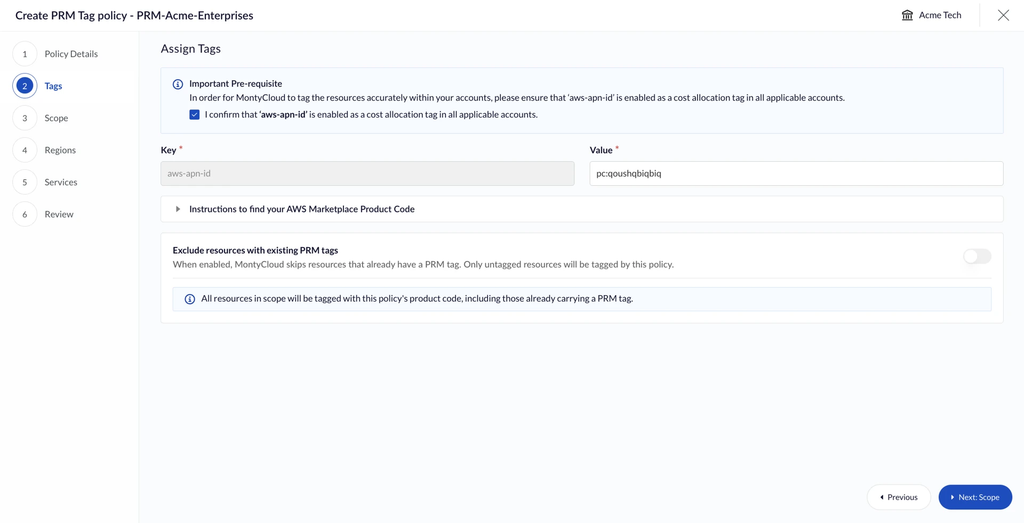
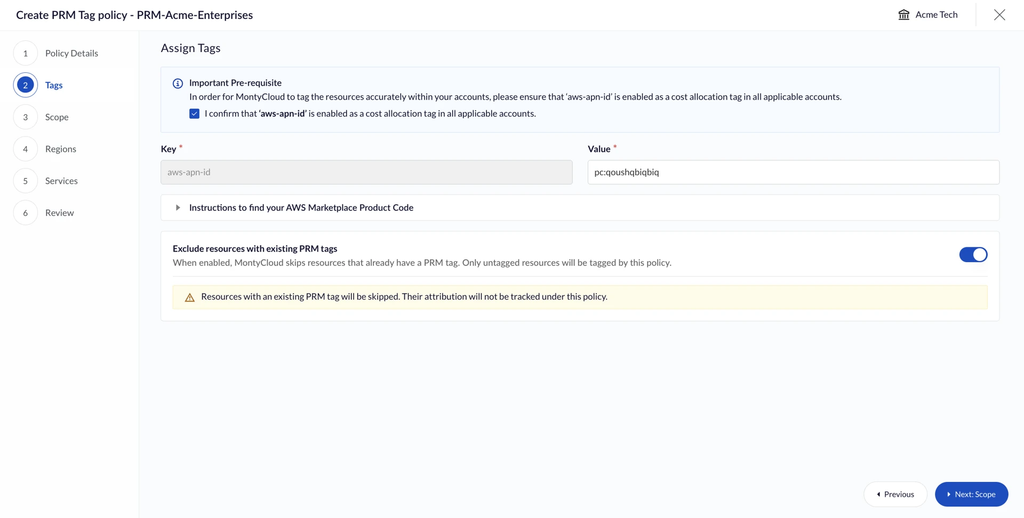
Option to stop tag overrides. By default, the pipeline tags every in-scope resource with the policy’s tag value. You can now turn overrides off at policy creation, so resources that already carry a different PRM tag value are left untouched.
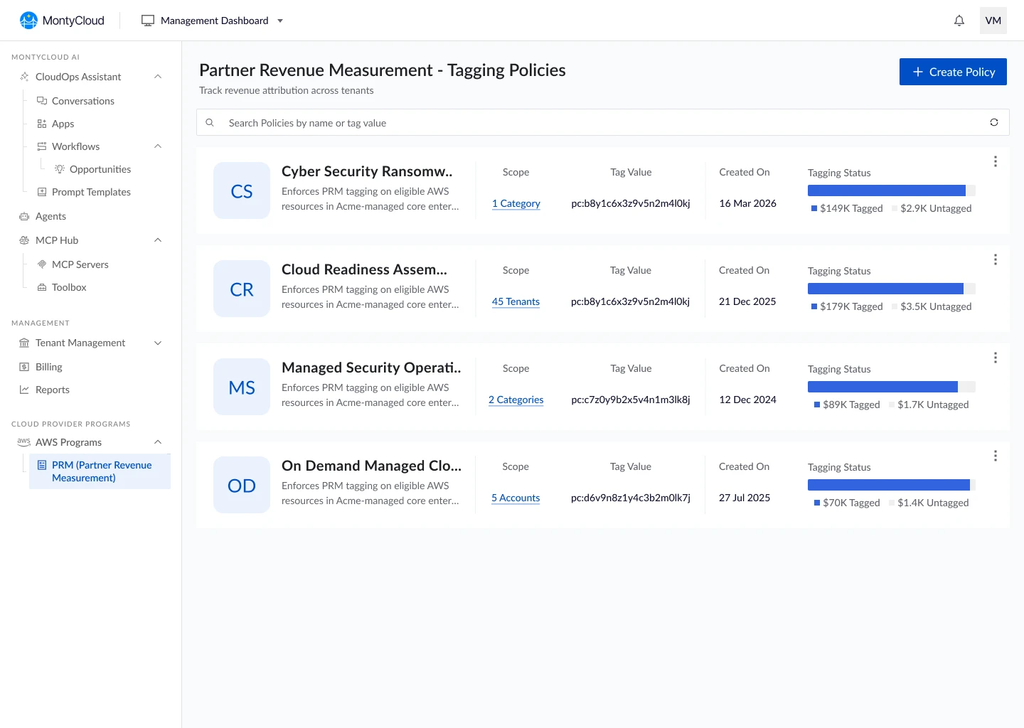
Tagged vs. untagged spend. Each policy now shows total spend, calculated as net amortized cost, alongside the tagged and untagged portions. This makes attribution gaps caused by untagged resources visible and measurable.
Edit policy. Update a policy’s name and description, and add tenants, accounts, services, resources, and regions to its scope without recreating it.
Audit tenants with CUR. Tenants onboarded with the Audit feature pack, which gives MontyCloud read-only access, can now be included in a PRM policy when the CUR option is enabled. Tagging is disabled for these tenants, while tagging coverage, readiness, and cost attribution insights continue to work.
How to set up PRM tagging in MontyCloud (7 steps)
Step 1: Create a PRM tagging policy
Define a policy for the offering you want to measure. Each policy includes a name, description, scope, and tag value, so tagging is structured per solution or service.
Choose whether the pipeline overrides existing PRM tags. By default, resources in scope are tagged with the policy’s tag value. Turning overrides off leaves resources that already carry a different PRM tag value untouched. This setting is fixed once the policy is created.

Step 2: Define the policy scope
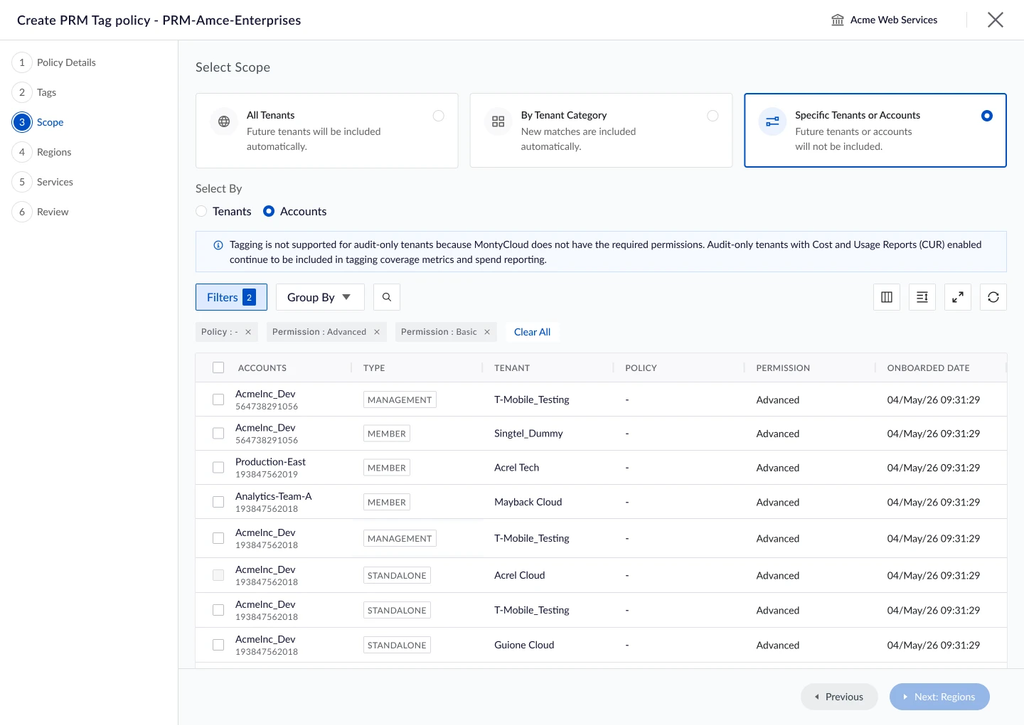
Choose where the policy applies: by tenant category, specific tenants, all tenants, or individual AWS accounts.
Account-level scope is useful when only part of a customer environment is partner-attributed. Select one or more connected accounts, and tagging and attribution apply to those accounts only. Accounts can be searched and filtered by type, tenant, policy, permission, and onboarded date, and grouped by tenant.
Audit tenants with CUR enabled can also be included. Tagging actions are disabled for these tenants because the platform does not hold write permissions, and the interface makes that clear. Spend is read from the AWS Cost and Usage Report, not from anything MontyCloud writes, so coverage, readiness, and cost attribution insights continue to work. Resources that already carry a valid PRM tag count as tagged spend, and everything else surfaces as untagged, showing where tags still need to be applied.
Step 3: Choose AWS regions
Select the AWS regions the policy should cover. Tagging and attribution stay within those regions. Regions can be selected ahead of time, so when workloads land there later, they are tagged automatically. New resources in selected regions are picked up by the next tagging cycle.
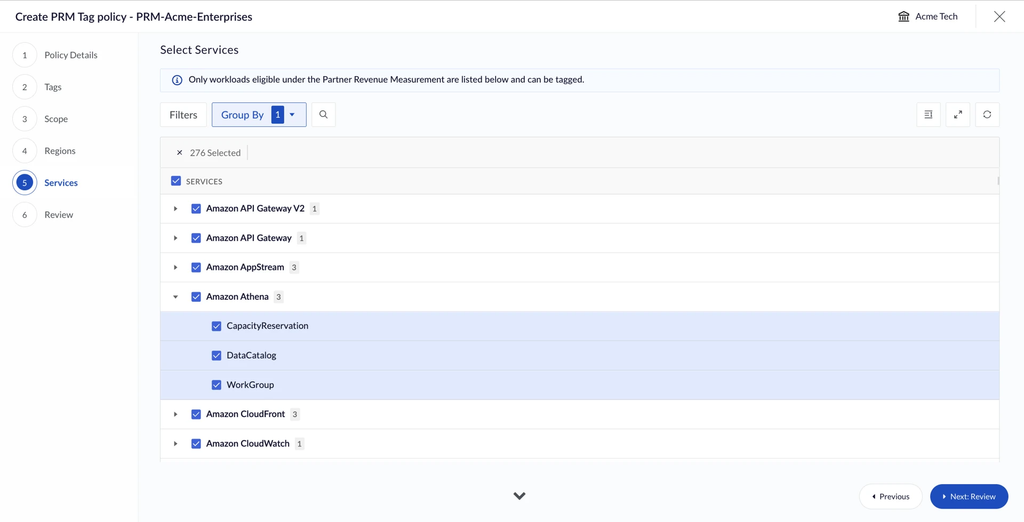
Step 4: Select eligible services and resources
Select all or specific AWS services and resources to include. MontyCloud limits selection to PRM-eligible services, so tagging stays relevant.
Step 5: Let MontyCloud apply tags automatically
MontyCloud applies tags through its daily tagging pipeline, with no manual effort. The platform surfaces warnings when required configurations are missing, and notifies admins when tagging completes.
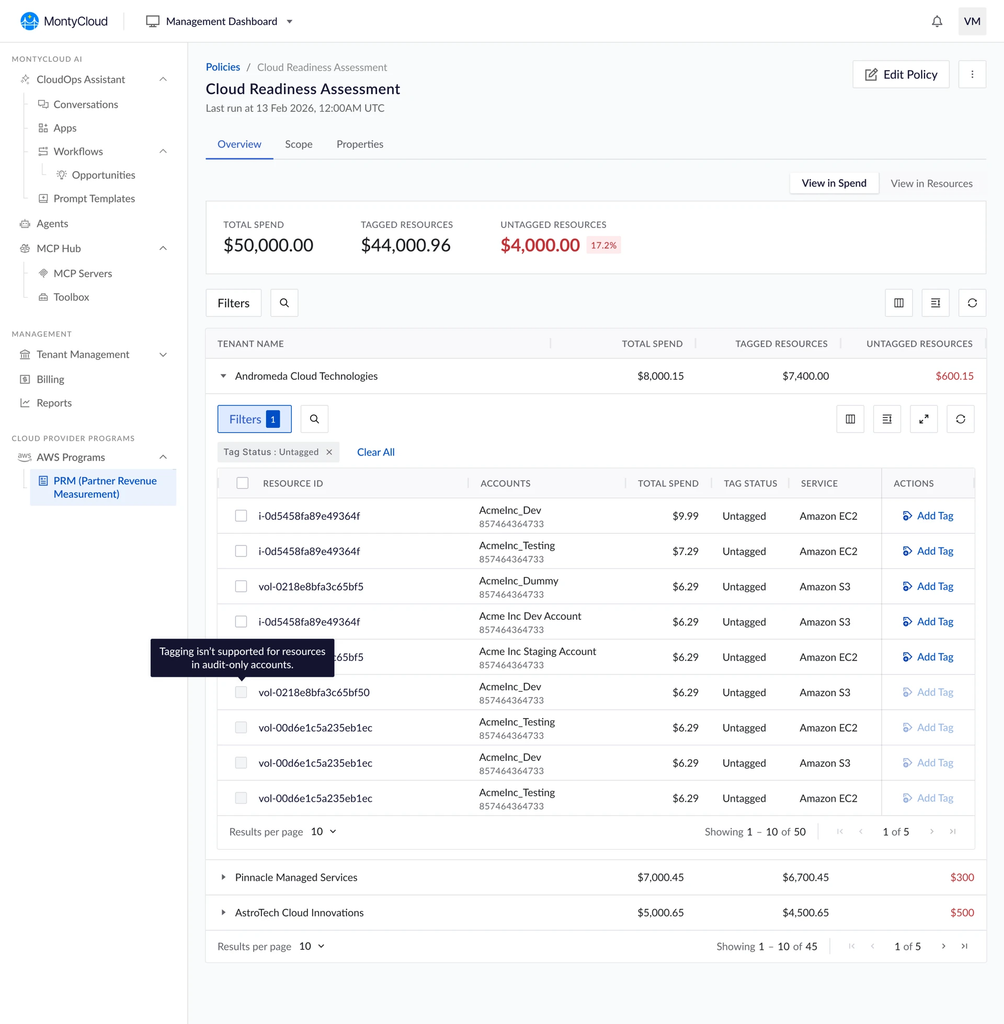
Step 6: See attributed and unattributed spend
Once the pipeline has run, each policy shows what tagging is capturing: total spend for the eligible services and resources in scope, the portion that is tagged, and the portion that is not. The same view is available at service and resource level, so gaps can be traced back to the workloads causing them.
| Metric | What it tells you |
|---|---|
| Total spend | Net amortized cost of the PRM-eligible services and resources within the policy scope |
| Tagged spend | The portion where a valid PRM tag value was present during usage |
| Untagged spend | The portion with no PRM tag, or a tag belonging to a different product code |
Step 7: Expand the policy as your business grows
Names and descriptions can be updated, and tenants, accounts, services, resources, and regions can be added to an existing policy at any time. Newly added entities join the next tagging cycle, and their spend is attributed once a valid PRM tag is present, never earlier than the date they were added. Already tagged resources are unaffected, and historical attribution is never recalculated.
To keep attribution stable and auditable, scope type, tag key, tag value, and the tag override setting are fixed after creation, and scope entries can be added but not removed.
Get started with automated PRM tagging
PRM is most effective when tagging is consistent, precisely scoped, and measurable. MontyCloud provides that foundation with policy-driven tagging, account- and region-level scoping, support for audit tenants, automated execution, and clear visibility into attributed and unattributed spend.
You have seen the seven steps. Now see where your own attribution is leaking. Request a demo to watch a PRM policy go from creation to a full view of tagged and untagged spend, by service and by resource.
Frequently asked questions (FAQs) about AWS PRM tagging
What is AWS Partner Revenue Measurement (PRM)?
AWS Partner Revenue Measurement (PRM) is the mechanism AWS uses to credit partner-influenced customer spend. Attribution depends on resource-level tags, so spend on untagged resources is not credited to the partner.
Why does untagged spend matter for PRM?
Untagged spend is eligible spend AWS does not attribute to the partner. MontyCloud shows untagged spend per policy, down to service and resource, so teams can find and close the largest gaps.
Can I apply PRM tags to specific AWS accounts instead of a whole tenant?
Yes. MontyCloud PRM policies can target one or more connected accounts within a tenant. Each account can belong to only one PRM policy, which prevents overlapping attribution.
Can I measure PRM attribution in read-only environments?
Yes. Tenants onboarded with the Audit feature pack can be included when the AWS Cost and Usage Report (CUR) option is enabled. Tagging is disabled, but coverage, readiness, and cost attribution insights continue to work.
Does MontyCloud overwrite existing PRM tags?
By default, resources in scope are tagged with the policy’s tag value. You can turn overrides off at policy creation so resources already carrying a different PRM tag value are left untouched.
Which AWS regions does MontyCloud PRM tagging support?
You can choose any AWS region supported by MontyCloud, including regions with no accounts yet. AWS GovCloud (US) is not supported.
How often does MontyCloud apply PRM tags?
MontyCloud applies tags through a daily tagging pipeline. New resources in scope are picked up in the next tagging cycle.