
For Managed Service Providers (MSPs) operating an AWS practice, the AWS Security Health Improvement Program (SHIP) is one of the most credible ways to start a security conversation with a customer. It is a structured, AWS-aligned framework for evaluating cloud security posture and prioritizing what to fix next. The challenge is delivery. Running SHIP manually means pulling configuration data from multiple AWS services, normalizing it into a customer-readable format, and writing the executive narrative by hand. That work is repeatable, but it does not scale.
MontyCloud, a launch partner for AWS SHIP, addresses this with a built-in SHIP report. The report is built from cloud signals already collected on your customer accounts and standardized into a consistent, AWS-aligned format that MSPs can deliver across their entire customer base.
In this blog, you will learn how the SHIP report works in MontyCloud, where it fits into your delivery workflow, and what it changes for an MSP practice running SHIP across many customers.
The Challenge: SHIP Delivery Does Not Scale
SHIP gives MSPs a strong framework. The bottleneck is operationalizing that framework across a portfolio.
Every customer environment is shaped differently. Security signals are spread across multiple AWS services and consoles, including monitoring, identity, vulnerability management, and data protection services.
For example, Security signals live in AWS Config, Amazon GuardDuty, Amazon Inspector, AWS Key Management Service (KMS), AWS Secrets Manager, AWS Security Hub, AWS Web Application Firewall (AWS WAF), and AWS IAM Access Analyzer. To produce a single SHIP-aligned narrative, an engineer has to gather those signals, reconcile them against AWS best practices, prioritize the gaps, and write a report a customer leader can act on. That work is consulting-grade, and the format is rarely consistent across customers.
For an MSP, the result is predictable. SHIP becomes a service reserved for the largest accounts. Customers who would benefit most from a structured review do not get one, and the practice cannot run SHIP as a repeatable motion across the book.
The Solution: SHIP as a Built-in Report in DAY2
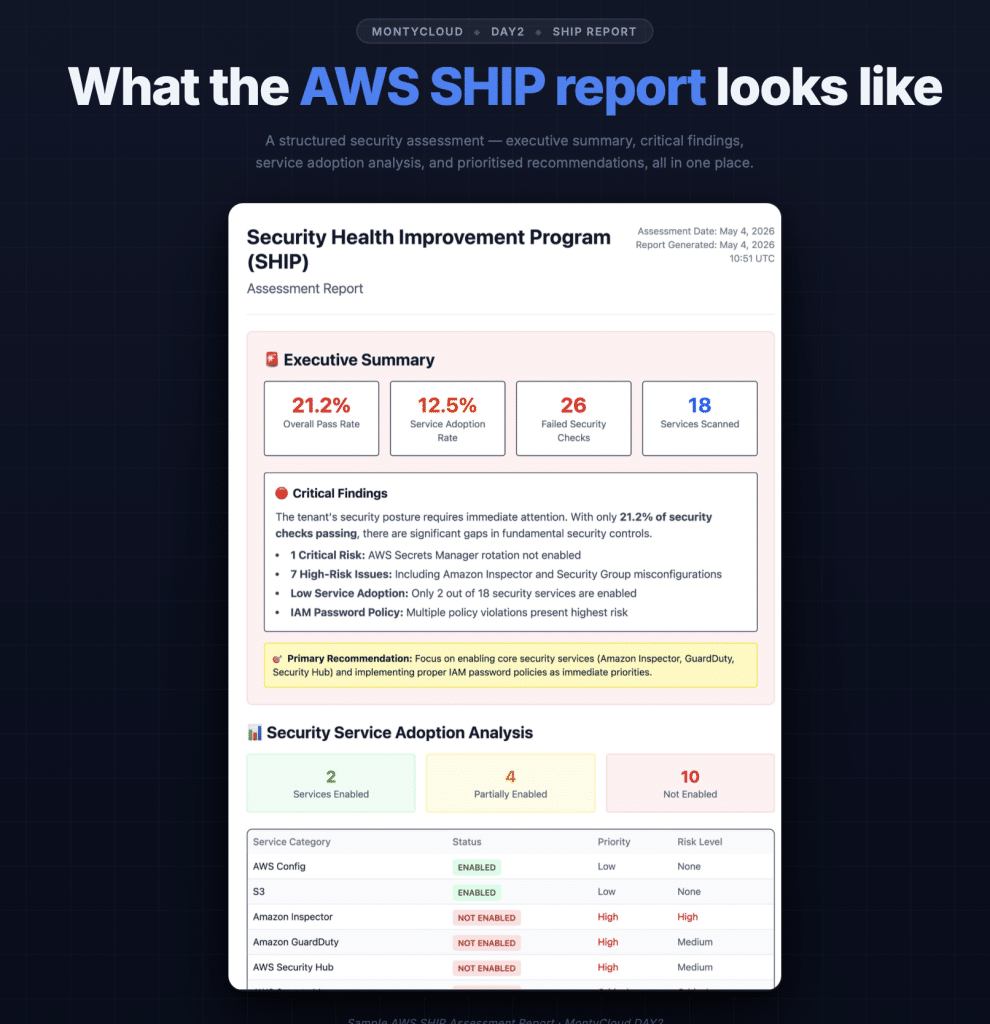
Your AWS security posture is summarized, analyzed, and prioritized in one SHIP report.
MontyCloud generates the SHIP report from cloud signals already present in your customer’s AWS environment. The findings are standardized into a consistent format, mapped to AWS security domains, and made available on demand inside the DAY2 platform.
There is no separate workflow to set up. The report draws on the same security data MontyCloud is already collecting on your customer accounts. Once the report is generated, it is immediately available for customer conversations.
This is what gives the SHIP report its differentiated value for MSPs:
- Standardization at scale: The same format, the same structure, and the same prioritization logic across every customer in your portfolio.
- Repeatability: SHIP becomes a recurring delivery, not a one-off engagement that has to be scoped and scheduled.
- Conversation enablement: The output is structured to support an executive review, so the next conversation can move from findings to remediation.
The report is designed to accelerate, not replace, deeper security assessments. It is based on the latest cloud signals available in the customer’s environment, and is best suited for continuous, repeatable security reviews across customers.
Generate the AWS SHIP Report with CloudOps Assistant

AI-powered AWS SHIP Reports built instantly with MontyCloud CloudOps Assistant.
The primary way to generate the AWS SHIP report is through AI Conversations in MontyCloud DAY2 CloudOps Assistant. An MSP selects the SHIP pinned prompt, chooses the customer or portfolio context, and CloudOps Assistant produces a customer-ready SHIP narrative structured for executive review.
The output summarizes security posture, highlights priority gaps, and frames the next steps for remediation. Instead of asking engineers to manually assemble findings and write the report, CloudOps Assistant gives the team a consistent starting point for the customer conversation.
How MontyCloud Helps MSPs Run SHIP at Scale
The SHIP report is part of a broader MontyCloud capability for MSPs running AWS security engagements. The platform helps MSPs:
- Generate a SHIP-aligned report across customer accounts on demand.
- View security findings across the portfolio in a consistent format.
- Understand prioritized risks with a clear mapping to AWS security domains.
- Move from findings to remediation through DAY2 governance and automation.
Why This Matters for an MSP Practice
For an MSP running an AWS security practice, the SHIP report changes three specific points of friction.
- SHIP becomes available for every customer in scope. When the report is generated from cloud signals already present in the environment, the constraint shifts. The question is no longer how many SHIP engagements your team can deliver this quarter. It is about which customer conversations you want to open this quarter.
- The customer-facing format is the same every time. Consistency does real work. It lets your account managers build a repeatable review motion, and it gives the customer a stable layout to track security posture across reviews without re-orienting on a new report each cycle.
- Findings map directly to AWS security domains. The output is structured so that the next conversation can be about remediation, follow-on services, or AWS security adoption. The report is the start of the conversation, not the end of it.
Additional ways to use SHIP outputs
MSP teams can also access SHIP through the DAY2 Reports library for structured review, or export detailed findings as CSV when the next step is remediation planning, ticket creation, or downstream workflow integration.
Getting Started
SHIP becomes a standard, repeatable security review across your customer base. Your team spends less time assembling data and more time on remediation and customer outcomes.
If you are an MSP running, or planning to run AWS SHIP engagements, contact the MontyCloud team to activate the SHIP report in your DAY2 environment.